Who Owns This Website? Check a Domain with RDAP and Spot a Phishing Email
0 / 6 steps
The goal
By the end you will be able to take the sender of a suspicious email, find out when its website name was registered and who registered it, and decide whether to trust it, using a free web tool and, if you want, one command.
Look, do not click. Everything here is lookups about public information. Never click a link in a message you do not trust, and never reply to it. You do not need to open the website to check it.
Words in this lesson
Hover (or tap and hold) a dotted word for a quick definition. Every word is also in the StashGrid glossary.
- Domain name — the readable name of a website or email sender
- Phishing — a fake message that tricks you into giving up a password or money
- RDAP — a lookup that tells you who registered a website name and when
- whois — the older version of RDAP
- Registrar — the shop a website name was bought from
- curl — a tool that fetches a web address and prints the answer
Why this lesson. PhishingIn plain words: A fake email, text or website that pretends to be someone you trust, like your bank, to trick you into giving up a password or money.Technical: Social engineering by message. Typical signs are urgency, a mismatched sender domain, a link that does not go where it says, and a request for credentials or payment.Click for the full glossary entry works because fake emails look real. But the sender cannot easily fake when their website name was created. A “bank” email from a name registered three days ago is a giveaway, and checking takes less than a minute.
The email says it is from your bank. The website name says it was born on Tuesday. One of them is lying, and it is not the one with a date stamp. — Nyx
Before you start. You only need a web browser for steps 1 to 3 and 5. Step 4 uses a command prompt (Windows) or Terminal (Mac, see the Mac page); it is optional.
Steps
01Got an email from someone unfamiliar? Find the sender’s domain
Open the email, but do not click anything inside it. Look at who it is from.
- You will see a friendly name, like Your Bank Security, and next to it an address in angle brackets, like <alerts@secure-yourbank-login.com>. The friendly name can say anything. The address is what counts.
- The domainIn plain words: The easy-to-read name of a website or email sender, like example.com. In an email from sam@example.com, the domain is the part after the @.Technical: A name registered in the global naming system, made of labels separated by dots, and resolved to addresses by DNS.Click for the full glossary entry is everything after the @ sign: in this example, secure-yourbank-login.com.
- On a phone, tap the sender’s name to reveal the full address.
- To check a link without opening it, hover over it on a computer (the real destination appears at the bottom of the window), or press and hold on a phone.

Select the domain and copy it (Ctrl + C, or press and hold on a phone).
Why this matters. Scammers register names that look like real ones: paypa1 with a number one, or yourbank-secure-login.com. The real company’s name is usually immediately before the final .com. In yourbank.com.evil.net the real domain is evil.net.
02Look it up with a web tool (no commands needed)
Go to lookup.icann.org, the lookup tool run by the organisation that oversees domainIn plain words: The easy-to-read name of a website or email sender, like example.com. In an email from sam@example.com, the domain is the part after the @.Technical: A name registered in the global naming system, made of labels separated by dots, and resolved to addresses by DNS.Click for the full glossary entry names. Paste the domain into the box and press Lookup.
Look for these lines in the answer:
- Registration date (also called Created) — the day the name was first registered.
- RegistrarIn plain words: The shop a website name was bought from.Technical: An accredited company that registers domain names for customers, such as GoDaddy or Namecheap. It is not necessarily where the website is hosted.Click for the full glossary entry — the shop it was bought from.
- Name servers — where its DNSIn plain words: The internet’s phone book. You type an easy name like stashgrid.ai, and DNS looks up the number address that computers really use, the way a street address tells the mail carrier where to go.Technical: Domain Name System. A worldwide set of servers that turns names into IP addresses. Your device asks a DNS server (usually your router or your provider) every time you visit a site.Click for the full glossary entry lives.
- Status — the lock flags. Do not worry about these for now.
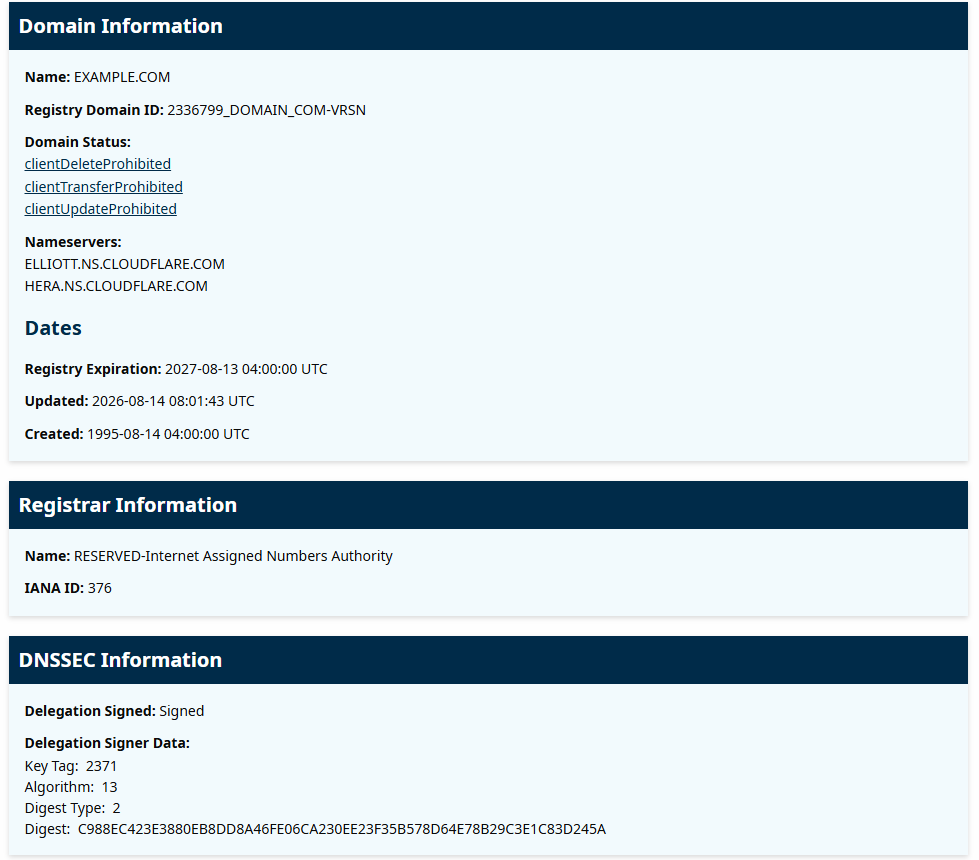
Why this matters. The registration date is the single most useful fact. A name that is a few days or weeks old, claiming to be a company founded decades ago, is a major red flag.
03Read the clues
Use the date, but do not use it alone.
- Registered in the last 30 days and pretending to be a big company — very suspicious.
- Registered years ago — a good sign, but not proof. Criminals also take over old, hacked sites.
- Details hidden or “redacted for privacy” — normal. Many honest owners hide them, so that alone means nothing.
- Name does not match the claim — the email says it is from your bank but the domainIn plain words: The easy-to-read name of a website or email sender, like example.com. In an email from sam@example.com, the domain is the part after the @.Technical: A name registered in the global naming system, made of labels separated by dots, and resolved to addresses by DNS.Click for the full glossary entry is something else. Trust the domain, not the display name.
A new domain is a clue, not a verdict. An old one is not a pass either. Stack the clues: new name, mismatched sender, urgent request, a link that wants a password. Three in a row is your answer. — Nyx
04Optional: look it up with a command (RDAP)
The same lookup from the command line. Windows uses curl.exe; a Mac uses curl. This fetches the answer and saves it in a file called rdap.txt:
> curl.exe -sL https://rdap.org/domain/example.com -o rdap.txt
Then open the file (Windows):
> notepad rdap.txt
On a Mac, use curl -sL https://rdap.org/domain/example.com -o rdap.txt and then open -e rdap.txt. In the file, press Ctrl + F (Cmd + F on a Mac) and search for registration. The date next to it is when the name was registered. For example.com it is 1995-08-14. Replace example.com with the domainIn plain words: The easy-to-read name of a website or email sender, like example.com. In an email from sam@example.com, the domain is the part after the @.Technical: A name registered in the global naming system, made of labels separated by dots, and resolved to addresses by DNS.Click for the full glossary entry from your email.
The answer is one long line of text in a format called JSON. Search is much easier than reading it. The words to look for are registration (the date), registrarIn plain words: The shop a website name was bought from.Technical: An accredited company that registers domain names for customers, such as GoDaddy or Namecheap. It is not necessarily where the website is hosted.Click for the full glossary entry (the shop) and nameservers.
Why this matters. RDAPIn plain words: A modern lookup for “who registered this website name, and when?” The most useful part is the date, because brand-new names are a warning sign.Technical: A standard, web-based (HTTPS and JSON) replacement for whois. Gives registration dates, registrar, name servers and status in a consistent format.Click for the full glossary entry is the modern replacement for whoisIn plain words: An old lookup that tells you who registered a website name and when.Technical: A text protocol (port 43) for domain and IP registration data. Much personal detail is now hidden for privacy. RDAP is its modern replacement.Click for the full glossary entry, and unlike whois it gives a predictable answer, which is why tools and scripts use it. Learning it also helps later when you check many domains at once.
05Decide what to do
If the domainIn plain words: The easy-to-read name of a website or email sender, like example.com. In an email from sam@example.com, the domain is the part after the @.Technical: A name registered in the global naming system, made of labels separated by dots, and resolved to addresses by DNS.Click for the full glossary entry looks wrong, do not click, reply, call a phone number in the email, or open attachments.
- If you think it might be real, go to the company’s website by typing the address yourself, or use its official app, and check there.
- Report the email and delete it. The next lesson shows how to report it in Gmail, Outlook and Apple Mail, and how to read the hidden headersIn plain words: The hidden “envelope” of an email that shows where it really came from. The name you see on top can be faked; the envelope is much harder to fake.Technical: Metadata lines (From, Reply-To, Return-Path, Received, Authentication-Results) added by the sender and each mail server along the way.Click for the full glossary entry.
- If you already clicked or typed a password, change that password right away and turn on two-step sign-in. If it was a bank or payment, call the number on the back of your card.
The defender’s move. Security teams do exactly this at scale: pull the domain from a suspicious email, check its age, block it, and report it. You just did the home version.
06Practise on a safe example
Look up a well-known name and a made-up one, and compare the answers.
- Look up example.com. Registered in 1995. Notice how old that is.
- Look up stashgrid.ai. Notice the registrarIn plain words: The shop a website name was bought from.Technical: An accredited company that registers domain names for customers, such as GoDaddy or Namecheap. It is not necessarily where the website is hosted.Click for the full glossary entry, and the date it was registered.
- Look up a name that surely does not exist, like zzqxwv-not-a-real-site-12345.com. A “not found” answer means nobody has registered it.
Why this matters. Seeing a real, old domainIn plain words: The easy-to-read name of a website or email sender, like example.com. In an email from sam@example.com, the domain is the part after the @.Technical: A name registered in the global naming system, made of labels separated by dots, and resolved to addresses by DNS.Click for the full glossary entry next to a brand-new one trains your eye. The numbers do the arguing for you.
What you learned
- sender domain — the part of the address after the @ sign
- RDAP — the modern lookup for who registered a name and when
- registration date — the single most useful clue: new names are suspicious
- stack the clues — new domain + mismatch + urgency + a password request
- look, do not click — you never need to open the site to check it
Read the official spec
These are the documents the engineers wrote. They are free and dense, so use them as a reference, not bedtime reading.
- RFC 9082 — RDAP query format
- RFC 9083 — RDAP JSON responses (the format you saw in step 4)
- RFC 3912 — whois, the older text protocol RDAP replaces
Tried it? Tell us
Nova drafted this lesson from Steven’s ideas. If a step broke, looked different on your screen, or you know a simpler way, tell us. Screens change between Windows and Mac versions, so your menus may not match exactly.
NextRead Email Headers and Report Phishing→
Go deeper
- Networking glossary — RDAPIn plain words: A modern lookup for “who registered this website name, and when?” The most useful part is the date, because brand-new names are a warning sign.Technical: A standard, web-based (HTTPS and JSON) replacement for whois. Gives registration dates, registrar, name servers and status in a consistent format.Click for the full glossary entry, phishingIn plain words: A fake email, text or website that pretends to be someone you trust, like your bank, to trick you into giving up a password or money.Technical: Social engineering by message. Typical signs are urgency, a mismatched sender domain, a link that does not go where it says, and a request for credentials or payment.Click for the full glossary entry, registrar and more
- What happens when you type a URL — how a name becomes a website
Original walkthrough. The curlIn plain words: A small tool that fetches a web address for you from the command prompt and prints what comes back, like a browser with no window.Technical: A command-line program for transferring data over HTTP and other protocols. Built into current Windows (as curl.exe), macOS and Linux.Click for the full glossary entry command was run against rdap.org for example.com, and the registration date and JSON layout above match what it returned. The ICANN lookup page and screenshots have not yet been walked through step by step with a real suspicious email. If something does not match what your computer does, tell me and I will fix it.